Skip to content
  • 📓 CIS 335 Notebook
  • 📋 CIS 335 Schedule
  • ▶ Groups and Tools
    • ▶ Group Assignments
      • Group Assignments & Network Settings
      • VCAT
  • ▶ Lab Projects
    • ▶ Lab Project 1
      • 2 Server LAMP Based Application
    • ▶ Lab Project 2
      • File Server and Permissions Lab
  • ▶ Week 1
    • ▶ Lab Activity 1A
      • Objective
      • Create a Virtual Machine
    • ▶ Lab Activity 1B
      • Objective
      • Install and Update Rocky Linux
      • Confirm Setup and Connectivity
  • ▶ Week 2
    • ▶ Lab Activity 2A
      • Objective
      • Create a VM Template
    • ▶ Lab Activity 2B
      • Objective
      • Create and Deploy from Templates
  • ▶ Week 3
    • ▶ Lab Activity 3
      • Objective
      • Prerequisites
      • Config the Webmin Repository
      • Config MariaDB
      • Install PHP and WordPress
  • ▶ Week 4
    • ▶ Lab Activity 4
      • Objective
      • VM Cleanup
      • Install Windows Server and Config DNS
  • ▶ Week 5
    • ▶ Lab Activity 5
      • Objective
      • Create a Striped RAID Volume
      • Group Storage Area Network (SAN) Server
  • ▶ Week 6
    • ▶ Lab Activity 6
      • Objective
      • Group DNS Server and Cleanup
      • Binary Arithmetic and Subnetting
  • ▶ Week 7
    • ▶ Lab Activity 7
      • Objective
      • Config New DHCP Server Profile
      • Install and Configure DHCP on DNS Server
      • Deploy New VM from Template
  • ▶ Week 9
    • ▶ Lab Activity 8A
      • Objective
      • Config A Domain Controller
    • ▶ Lab Activity 8B
      • Objective
      • Bind Server to Domain Controller
  • ▶ Week 11
    • ▶ Lab Activity 9
      • Objective
  • ▶ Week 12
    • ▶ Lab Activity 10
      • Objective
      • Prerequisites
      • Group Policy Object - Staff Users
      • Group Policy Object - Marketing Users
  • ▶ Week 13
    • ▶ Lab Activity 11
      • Objective
      • Create an Azure Account
      • Create a Resource Group
      • Create an Azure Function App
      • Create and Deploy a Function in VS Code
    • ▶ Lab Activity 12
      • Objective
      • Create Another Azure Function App
      • Deploy a Serverless LLM Endpoint in VS Code

Lab Activity 10:

Objective: Create two Group Policy Objects (GPOs) on the Domain Controller. Link the Staff Users Policy to the Staff OU. Link the Marketing Users Policy to the Marketing OU.


  • At the end of this assignment you should:
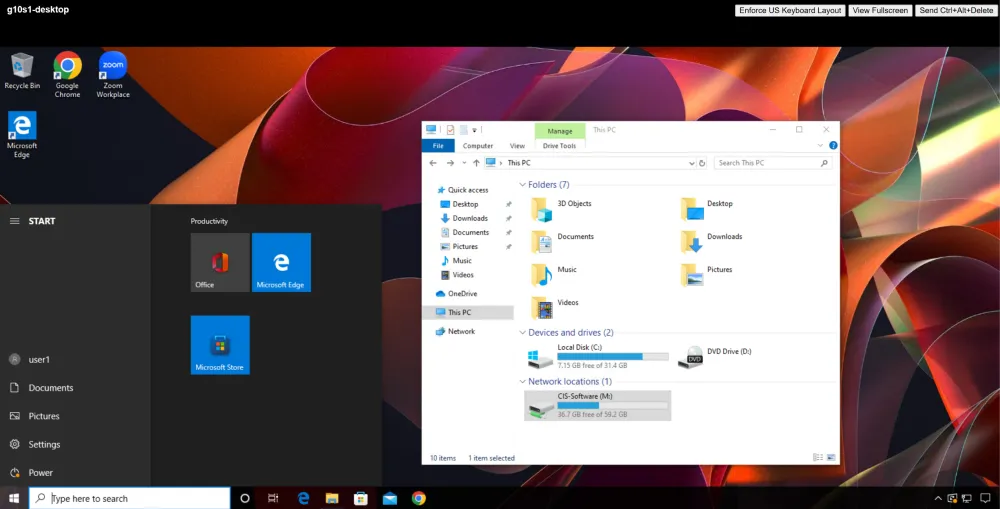
    • Submit a screenshot of your Windows 10 Start Menu showing the Windows 10 Client logged in as the user1 account, the Google Chrome and Zoom desktop shortcuts, the notification area, and the drive map, similar to the below screengrab.

gXsY-desktop Windows 10 desktop logged in as user1 showing Chrome and Zoom shortcuts, no clock in notification area, and M: drive map
← Previous Objective Next → Prerequisites

On this page

  • Lab Activity 10:
  • Objective: Create two Group Policy Objects (GPOs) on the Domain Controller. Link the Staff Users Policy to the Staff OU. Link the Marketing Users Policy to the Marketing OU.