Skip to content
  • 📓 CIS 335 Notebook
  • 📋 CIS 335 Schedule
  • ▶ Groups and Tools
    • ▶ Group Assignments
      • Group Assignments & Network Settings
      • VCAT
  • ▶ Lab Projects
    • ▶ Lab Project 1
      • 2 Server LAMP Based Application
    • ▶ Lab Project 2
      • File Server and Permissions Lab
  • ▶ Week 1
    • ▶ Lab Activity 1A
      • Objective
      • Create a Virtual Machine
    • ▶ Lab Activity 1B
      • Objective
      • Install and Update Rocky Linux
      • Confirm Setup and Connectivity
  • ▶ Week 2
    • ▶ Lab Activity 2A
      • Objective
      • Create a VM Template
    • ▶ Lab Activity 2B
      • Objective
      • Create and Deploy from Templates
  • ▶ Week 3
    • ▶ Lab Activity 3
      • Objective
      • Prerequisites
      • Config the Webmin Repository
      • Config MariaDB
      • Install PHP and WordPress
  • ▶ Week 4
    • ▶ Lab Activity 4
      • Objective
      • VM Cleanup
      • Install Windows Server and Config DNS
  • ▶ Week 5
    • ▶ Lab Activity 5
      • Objective
      • Create a Striped RAID Volume
      • Group Storage Area Network (SAN) Server
  • ▶ Week 6
    • ▶ Lab Activity 6
      • Objective
      • Group DNS Server and Cleanup
      • Binary Arithmetic and Subnetting
  • ▶ Week 7
    • ▶ Lab Activity 7
      • Objective
      • Config New DHCP Server Profile
      • Install and Configure DHCP on DNS Server
      • Deploy New VM from Template
  • ▶ Week 9
    • ▶ Lab Activity 8A
      • Objective
      • Config A Domain Controller
    • ▶ Lab Activity 8B
      • Objective
      • Bind Server to Domain Controller
  • ▶ Week 11
    • ▶ Lab Activity 9
      • Objective
  • ▶ Week 12
    • ▶ Lab Activity 10
      • Objective
      • Prerequisites
      • Group Policy Object - Staff Users
      • Group Policy Object - Marketing Users
  • ▶ Week 13
    • ▶ Lab Activity 11
      • Objective
      • Create an Azure Account
      • Create a Resource Group
      • Create an Azure Function App
      • Create and Deploy a Function in VS Code
    • ▶ Lab Activity 12
      • Objective
      • Create Another Azure Function App
      • Deploy a Serverless LLM Endpoint in VS Code

Lab Activity 9:

Objective: Following the instructions in Lab 2, step 3 of the individual portion, use the appropriate template to create and deploy a Windows 10 Desktop VM.


  • At the end of this assignment you should:
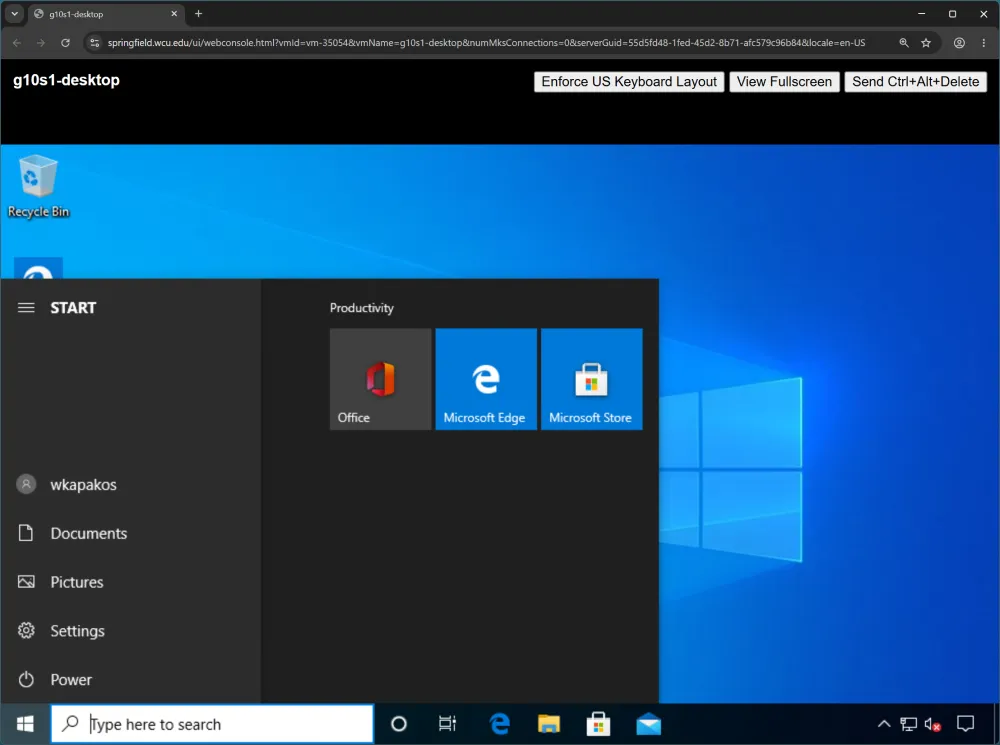
    • Submit a screenshot of your Windows 10 Start Menu showing the client machine logged in as your AD faculty account, similar to the below screengrab.

gXsY-desktop Windows 10 Start Menu open showing the desktop logged in as an Active Directory faculty account
← Previous Bind Server to Domain Controller Next → Objective

On this page

  • Lab Activity 9:
  • Objective: Following the instructions in Lab 2, step 3 of the individual portion, use the appropriate template to create and deploy a Windows 10 Desktop VM.